



Rapid Dispute Resolution (RDR) is a powerful chargeback prevention tool that can automatically refund a disputed transaction. It helps keep your customers happy while protecting key risk metrics like your VAMP ratio.
Check out our detailed guide to see how RDR could help your business today.
Definition & explanation
What is Rapid Dispute Resolution (RDR)?
RDR is an automated tool that resolves transaction disputes in real time by instantly refunding customers.

You set the criteria — such as orders under a certain amount or a dispute with a particular reason code — and the bank works on your behalf to automatically refund customers for disputes that meet your standards.
NOTE
RDR is a Visa product and is only effective for Visa disputes.
Key benefits of RDR
Why would I use RDR?
Effective chargeback prevention strategies are meant to make your life easier and your business more profitable. RDR is one solution that helps keep chargeback rates low, identify issues quickly, and save on operational costs.
Lower your VAMP ratio.
The greatest benefit of a solution like RDR is that you can easily maintain low chargeback rates with minimal effort.
Since the launch of the Visa Acquirer Monitoring Program (VAMP), it is critically important to keep your chargeback activity to a minimum. And RDR is one of the most effective ways to make that happen.
Lower processing costs.
If you can lower your VAMP ratio, you can probably lower your processing costs. Acquirers and processors base processing fees on anticipated risk levels. The less risk you pose, the less you could pay.
Identify problems before they become chargebacks.
On average, a chargeback notice will reach your business two to five weeks after the cardholder has disputed a transaction. That’s a long time.
If a dispute is tied to a wide-spread issue — for example, a fraudster using your business to test the validity of stolen credit card numbers — customers could file hundreds of additional disputes before you detect the problem.
The good news is that RDR works in real time. The second a customer initiates a dispute, the system goes to work, and you are notified immediately that there is an issue. And if the problem is bigger than one chargeback, you can intervene quickly to stop an attack.
Stop the fulfillment of unauthorised orders.
When chargebacks happen, it’s usually too late to recuperate the inventory. By the time you get a notice, you have likely already shipped off the order. And if that order was unauthorised, you’re unlikely to get the goods back.
However, with RDR you get notices in real time, often before order fulfillment is complete. So the next time a cardholder says a transaction is unauthorised, you can cancel the shipment, saving your inventory and the costs associated with shipping.
Save time by automating refunds.
Because RDR automatically issues refunds on your behalf, you don’t have to expend any labor to resolve disputes. You can also automate your CRM reconciliation process with solutions like AltoShield to save more time and resources. Then, you can use those resources to solve more complex issues or focus on growing your business.
How merchant chargeback prevention software works
How does RDR work?
RDR is a fully automated chargeback prevention tool for Visa transactions. The technology opens a line of communication between issuers and acquires. Once you are onboarded with RDR, your customers’ banks will work with your acquirer to resolve disputes on your behalf.
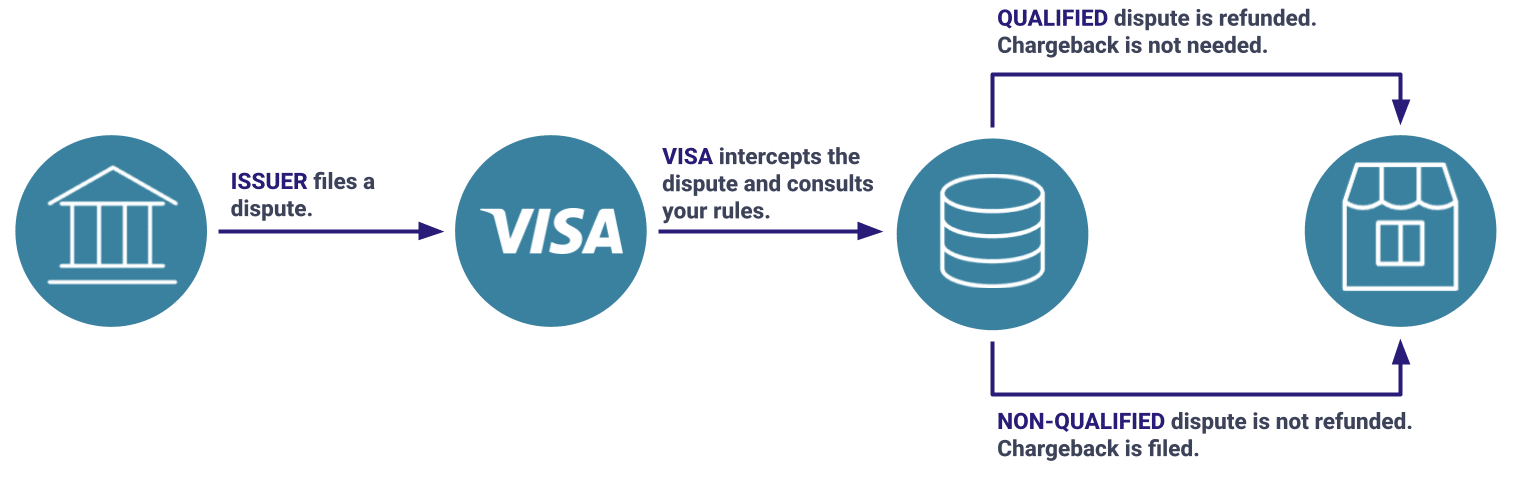
Here’s a high-level overview of how RDR works:
STEP 1: When a cardholder disputes a transaction, the Visa issuer will file a dispute.
STEP 2: Visa will intercept the dispute and check to see if you are enrolled in RDR. If you are not enrolled, the dispute will progress to a chargeback. But if you are enrolled, Visa will create an RDR case instead of a chargeback.
STEP 3: Visa will check your filters. If the case is within your rule set, Visa will issue a refund and notify the issuer that the case has been resolved. A chargeback is prevented. If your filters don’t apply, Visa will advance the case to a chargeback. You then have the option of fighting the chargeback if you’d like.
STEP 4: Each day, your acquirer will generate a report of RDR cases (both those refunded and those not refunded).
STEP 5: Your solution provider will receive this report and share the data with you.
STEP 6: The RDR case data will be used to reconcile your CRM (note that the transaction was disputed, log a refund if applicable, cancel recurring transactions if applicable, etc.)
The process looks like this:
Implementing RDR is a pretty straightforward process. And once you’re onboarded, you can start seeing the benefits of the solution within hours.
Here’s how you would implement and manage RDR.

Choose a trusted provider — like AltoShield — to onboard the solution.
If you are not already working with a chargeback management company or you want to switch to someone new, make sure the provider offers these things with their RDR solution:
- Real-time reporting
- Automated CRM reconciliation
- No monthly minimums
- No long-term contracts

During onboarding, you will work with your provider to set up filters that will determine which transactions will and won’t automatically get refunded.
Filters can be set on the following characteristics:
- Issuer BIN
- Transaction date
- Authorization date and time
- Transaction amount
- Transaction currency code
- Purchase identifier
- Dispute category
- Dispute condition code

RDR can be implemented and start working for your business in a matter of days.
When a customer initiates a dispute, Visa immediately activates the RDR workflow, consults your pre-set criteria, and automatically refunds the customer for a qualifying transaction. The chargeback is prevented and the case is closed.

Once RDR is up and running, you’ll want to monitor outcomes and the reconciliation process.
If you choose to onboard RDR through AltoShield, we can automatically reconcile your CRM by noting that a refund was issued and stopping recurring transactions (if applicable).
If you don’t work with AltoShield, you will need to pull daily reports and manually update your CRM whenever a refund is issued.

After running the solution for a while, you’ll start to notice patterns. You may need to tweak your filters or modify your business’s policies to ensure you’re getting the best possible outcomes.
For example, if a certain product has a high RDR rate, you might consider removing the item from your inventory. Or if a certain region has a higher RDR rate than another, maybe you stop selling in the higher risk region.
RDR coverage and integration options
RDR is a global solution, which means that Visa issuers all over the world are integrated. No matter where your customers are or where they transact, as long as they are using a Visa payment card, you should be covered.
Even though RDR is a Visa product, merchants don’t integrate directly through Visa. Instead, merchants work with a Visa partner — like AltoPay.
There are two ways to integrate with RDR.
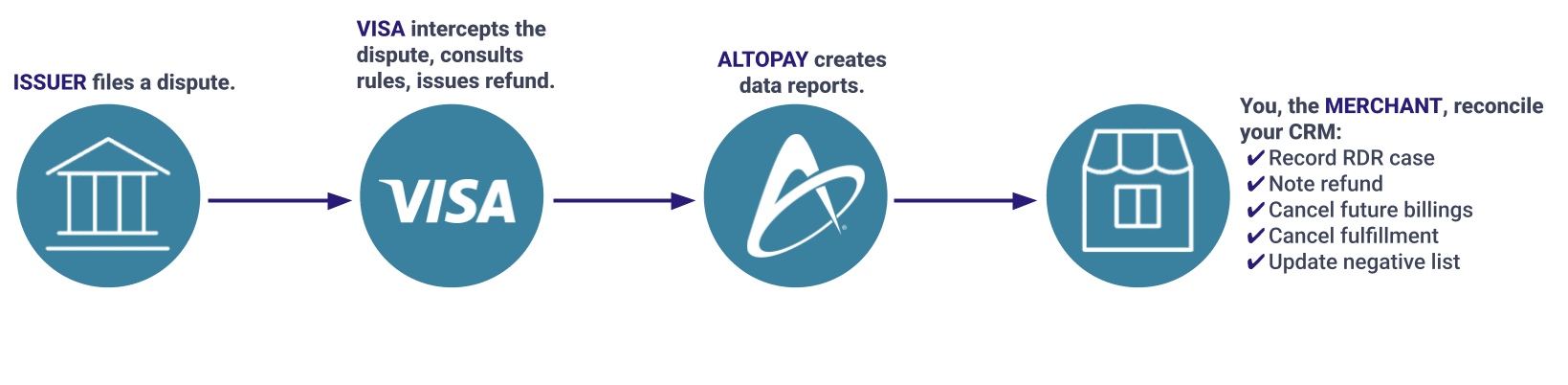
Manual reconciliation
This option is available to all merchants. Your solution provider doesn’t need to be integrated with your CRM, but you will have to engage in some manual labor.
Here’s how it works.
- You onboard RDR.
- RDR notices are sent to Visa.
- Visa refunds applicable disputes.
- Your solution provider receives and shares a daily report of all RDR cases.
- You use the data in the report to locate the corresponding transactions in your CRM.
- You update your CRM in response to the RDR activity (note the refund, stop recurring transactions, etc.)
The process looks like this:
Automated reconciliation
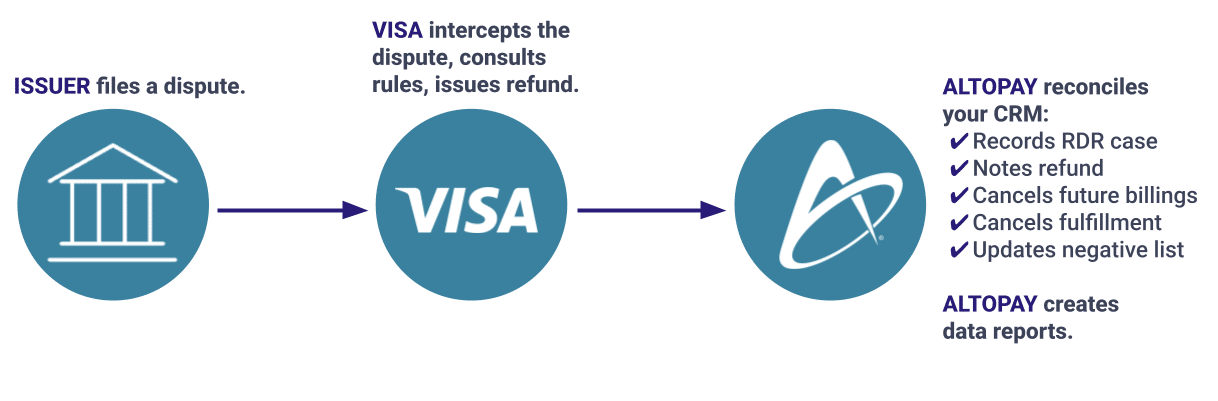
This option is more efficient, less labor intensive, and less likely to cause data errors. But it does require your solution provider to be integrated with your CRM.
Here’s how it works.
- You onboard RDR.
- RDR notices are sent to Visa.
- Visa refunds applicable disputes.
- Your solution provider receives and shares a daily report of all RDR cases.
- Your solution provider uses the data in the report to locate the corresponding transactions in your CRM.
- Your solution provider updates your CRM in response to the RDR activity (notes the refund, stops recurring transactions, etc.)
The process looks like this:
RDR Results
What is the success rate for RDR?
RDR is a highly effective chargeback management tool, capable of resolving about 90%+ of Visa disputes.
Why can’t RDR stop 100% of disputes?
Even though all Visa issuers have access to RDR technology, not all have fully adopted the solution.
That being said, at the end of the day, your RDR results will depend entirely on your personal preferences.
You could decide to refund every RDR case that comes through. This means you’ll prevent the maximum amount of chargebacks and your VAMP ratio will be as low as possible. But, you will likely refund invalid disputes — cases of friendly fraud that could be fought and won.
On the other hand, if you use RDR conservatively and refund very little, you could maximize revenue by exposing friendly fraud when it happens. But you’ll have a higher VAMP ratio and will devote more resources to fighting chargebacks — a process that can be labor intensive and error prone.
The bottom line is this: RDR outcomes will be a reflection of your business’s unique risk thresholds.
Use cases
How do I know if RDR is a good fit for my business?
All merchants processing card-not-present transactions can benefit from RDR. It can be especially helpful if your business has any of the following characteristics.
- You have a VAMP ratio of 1.5% or above
- You sell (or want to sell) internationally where risks vary and can catch you off guard.
- You sell physical goods that could be retained in cases of unauthorised transactions.
- You sell goods or services with a free trial option (which typically leads to higher-than-average chargeback activity).
- You are (or think you will be) enrolled in VAMP.
- You want to obtain additional merchant accounts and need to prove your business is reputable.
If you’re still unsure whether RDR is a good fit for your business, get in touch with us. We’re more than happy to answer any questions you might have.
RELATED READING
Prevention Alerts vs. RDR: Understanding your options
What’s the difference between RDR and prevention alerts?
Prevention alerts and RDR are both chargeback prevention solutions that allow merchants to refund disputed transactions to avoid chargebacks. The way each tool resolves disputes is slightly different.
- Prevention alerts: When a cardholder disputes a transaction, the issuer can send an alert to notify you of a potential chargeback. Once you (or your solution provider) receives the alert, you can choose to issue a refund and respond to the alert. You can complete this process manually or fully automate it.
- RDR: When a cardholder disputes a transaction, RDR can intercept the case before it becomes a chargeback. If the transaction meets your pre-set criteria, your acquirer will automatically refund the transaction.
RELATED READING
For an in-depth comparison between prevention alerts and RDR, check out our alert vs. RDR guide.
Financial ROI and cost savings
How much does RDR cost?
RDR pricing is set by Visa, so there isn’t a whole lot of flexibility. In general, RDR pricing is roughly equivalent to your chargeback fee.
Pricing can be impacted by a couple of factors.
- Volume: Merchants with high transaction volumes may qualify for lower pricing.
- Bundles: Using more than one solution from the same provider may lower the price you pay for each individual tool.
- Risk: Pricing can fluctuate based on the number of chargebacks you receive and your perceived level of risk.
RELATED READING
The AltoPay difference
Why choose AltoShield for RDR?
You have options when it comes to choosing a solution provider for RDR chargeback prevention. However, not all options are equal.
Here’s what makes AltoPay different.
- Get a complete strategy (RDR + alerts) with a single contract and platform.
- Solve issues as they happen with real-time data.
- Automatically reconcile your CRM every time a dispute is resolved.
- Tap into more than 15 years of experience to optimize your chargeback prevention strategy for maximum ROI.
- Utilize on-demand support from real humans who want to help your business succeed.
- Update rules and policies whenever you need to.
- Leverage global coverage to safely expand into new territories.
Getting started with RDR from AltoPay
Our simple, 3-step onboarding process can start helping you prevent chargebacks within 24 hours. Here’s how it works.
Questions and answers
Frequently asked questions about RDR
Can RDR remove TC40s from my VAMP ratio?
No, RDR will not remove TC40s from your VAMP ratio. However, RDR can still lower your overall chargeback counts, helping to improve ratios over time.
The chargeback fee with my acquirer is cheaper than what RDR costs. So why would I bother using it?
Chargeback fees aren’t the only consequence of receiving a chargeback. Every changeback you receive contributes to your VAMP ratio and overall merchant account health. If you receive too many chargebacks in a given timeframe, you could be enrolled in VAMP, which comes with additional fines and penalties.
Additionally, your merchant account provider may not want to continue doing business with you if chargebacks become a problem. And higher chargeback activity leads to higher processing fees.
In general, it’s best practice to prevent chargebacks from happening in the first place.
If I use RDR, do I have to refund everything?
No, you can let cases advance to chargebacks if you have a strategy in place to fight invalid disputes.
If I use RDR to refund everything, will my VAMP ratio be 0%?
Unfortunately, no. Chargebacks are only one part of your VAMP ratio. TC40s are still counted. So even if you resolve the dispute, a corresponding TC40 would still impact your ratio.
How do I know if a dispute has been resolved with an RDR refund?
Your solution provider should be able to provide a daily report that lists all your RDR cases.
You can also look at the chargeback report provided by your acquirer or processor. Any case that has an M next to the reason code — for example M10.4 — is an RDR case.
I don’t have a merchant account with AltoPay. Can I still get RDR from you?
Yes! You can get chargeback prevention solutions from us even if you don’t have a merchant account. Let us know if you’d like to get started.
AUTHOR
Jessica Velasco
For more than a decade, Jessica Velasco has been a thought leader in the payments industry. She aims to provide readers with valuable, easy-to-understand resources.